Finding out who can play
Ask the squad, chase the ones who haven't answered, and see the whole picture in one list instead of a group chat.
Where people answer
Players, and guardians acting for them, say whether they can make a match or a session in the Player Hub. Where a player has a guardian recorded, it’s the guardian who answers and is contacted.
That’s worth knowing: an adult player with nobody recorded is contacted directly. It follows who’s recorded as acting for whom, not anybody’s age.
Reading the answers
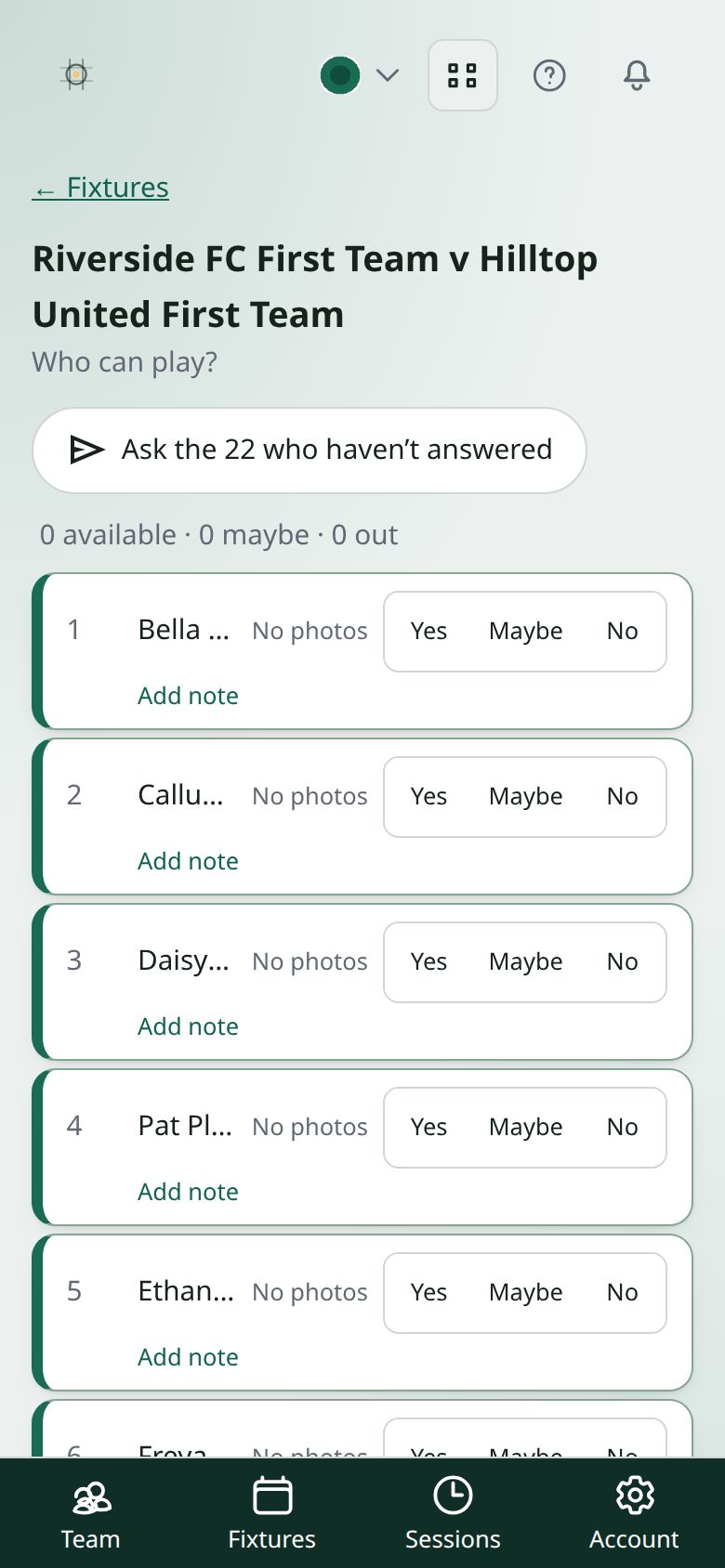
On Fixtures, press Availability on a match that hasn’t been played yet. For a session, open it from Sessions and look under Who can make it.
Each person is Yes, Maybe or No, or hasn’t answered. The top of the list counts how many are available, maybe and out.
Not answered is the useful one. It’s the list to chase, and it’s deliberately not counted as a no.
Chasing
For a match, press Ask the … who haven’t answered. It only goes to people who haven’t answered, rather than messaging everybody — people stop reading a sender who contacts them about things they’ve already dealt with. You can press it again later: it asks them again in the app, but doesn’t email anybody twice about the same game.
When everybody has answered, the button says Everyone has answered.
Answering for somebody
If somebody tells you at training, press Yes, Maybe or No beside their name yourself, and Add note if it helps. It’s stored the same way — the point is the list being right, not who typed it.
If a session moves
If its date or time changes, the answers are cleared and the squad is told to answer again — see putting training in the calendar. Somebody who could make Tuesday hasn’t agreed to Thursday.