What you pay for, and what’s free
The football side of this platform is free. The paid extras are facility booking and the developer platform, for as long as you want them, and subs collection, once your club collects enough through us in a year.
Your summary
The Subscription app opens on a Summary of what your club pays, in the order you’d ask:
- Anything wrong, first: a payment that didn’t go through, or a card about to expire, with the button that fixes it.
- Your next payment: how much, and on what date, and the card it’ll be taken from. Update card changes the card, on a secure page.
- Every add-on: whether you have it, are trying it (with the days left) or haven’t added it, and what the plan you pay for costs a month. Each one opens its own page.
- Your subscription: whether it’s active and when it renews.
Your invoices are under Invoices, ready to view or download, with the VAT shown separately.
What’s free
Everything most clubs use, with no card: your teams and squads, players and guardians, fixtures and results, availability, match recording and notifications. That part isn’t a trial, so there’s nothing to run out.
What’s paid
Facility booking. It lets people book and pay for your pitches online, with your own fixtures already in the calendar so nobody double-books the first team’s Saturday.
It’s charged per bookable facility each month, with a cap however many pitches you have. The current prices, including VAT, are on Pricing.
A “bookable facility” is one you’ve opened to the public — so the price follows how much of your ground you’re letting, rather than how big your club is.
Closing a pitch doesn’t change your bill on its own. You pay for the tier you chose until you change it, so if you close a pitch for the winter, switch down as well and you’ll pay less from that moment.
The developer platform. Live API keys and webhooks, so your club’s website or membership system can work with your fixtures, results, squads and facility bookings. One flat price a month; it’s on Pricing. The sandbox, where whoever builds your website can build and test first, needs no add-on. It’s a separate add-on from facility booking: adding or stopping one never changes the other. It can be tried free for 30 days, from its own Start free trial on its page under Add-ons, and it’s added and stopped the same way as facility booking. What it does is in the Developers guides.
Finances. Your club’s books: money in and out with receipts, each home game’s crowd and gate, budgets, sponsors, reports and the season’s accounts for your AGM. One flat price a month; it’s on Pricing. Your club account, Stripe payouts and Getting paid are in every club’s Finances app without it. It can be tried free for 30 days, from Start free trial on any of its sections in Finances or on its page under Add-ons, and it’s added and stopped the same way as facility booking. If it stops, everything your club recorded stays readable and can still be downloaded. What it does is in The Finances add-on.
Subs collection. Collecting subs and fees by card or Direct Debit through LEKKIN costs nothing until your club collects a set amount a year through us. Above that, it’s one flat amount a month, in bands — the bands are on Pricing. You don’t add it or choose a band: it’s worked out for you.
- What counts: card and Direct Debit payments that went through in the last 12 months, less refunds. Cash, cheques and transfers you record yourself never count.
- It’s checked once a month. Your band goes down straight away, and only goes up after two checks in a row. The first month over a line, club admins get an email saying so, so an increase never arrives unannounced.
- A change applies from your next bill. Nothing you’ve already paid changes.
- Subs in the Subscription app shows the whole calculation under Subs collection: what you’ve collected, your band, every band beside it and the monthly checks behind it.
If your club reaches a paid band and has no card with us, club admins are asked to add one, in the Subscription app, and have 30 days. Nothing changes during that time. After it, players can’t set up new Direct Debits with the club until a card is added — the ones already running carry on, and every charge can still be paid by card.
Trying it free first
Facility booking can be tried for 30 days, with no card. Press Start free trial on Facility booking, under Add-ons in the Subscription app, or on the banner in Facilities that says facility booking is a paid add-on. The trial covers all your pitches, so there’s no plan to pick to start one, and each club gets one free trial of facility booking.
Buying part-way through keeps your free days: nothing is charged for facility booking until the date the trial would have ended. If your club already pays for something else each month, facility booking is added to that bill instead, and covers only the days after your trial. If the trial ends and you haven’t bought it, new bookings pause and everything already booked stays — the same as If it lapses or you cancel, below.
There’s the whole of it in Trying facility booking free for 30 days.
Adding it
- Open the Subscription app: it’s in the menu at the top left of every app, beside your club’s name. Its Summary shows what you have, what each costs, your next payment and your card.
- Open Add-ons, then Facility booking. Under Add facility booking, find how many pitches you want to open.
- Press Add beside it. If your club doesn’t pay for anything yet, you’re taken to a secure payment page to enter a card. If it already has a subscription, you’re shown what your next bill will be instead, and it’s added when you confirm, with no card to enter.
- Either way, it’s switched on when you’re back on the page. You don’t need to copy a licence key or check your email — we do that part.
Only a club admin can do this — starting a trial included. The Subscription app is for club admins: what the club pays isn’t something a secretary has to manage.
If you’re part-way through a free trial, adding it works exactly the same way, and you’re not charged for any of the trial’s days. Your first payment falls on the date the trial was due to end, or, if your club already pays for something else each month, facility booking joins that bill from the day the trial ends.
Changing how many pitches
Under Change your facility booking plan, press Switch on a different tier’s card. You’re shown what your next bill will be; press Switch plan to go ahead. It takes effect straight away, and you keep the same renewal date.
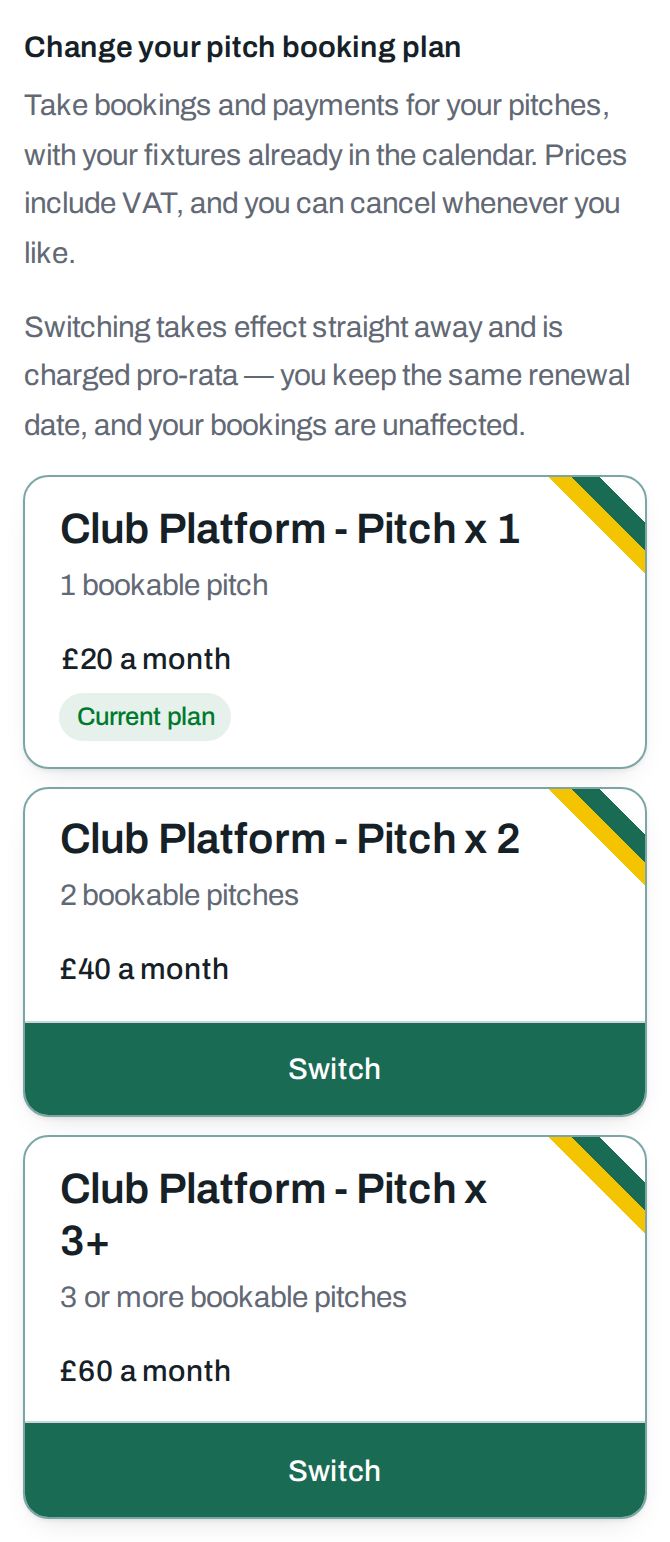
It’s charged pro-rata either way. Moving up, you pay the difference for the rest of the month rather than starting a new one. Moving down, you’re credited for the part you’d already paid for and haven’t used — that credit comes off your next invoice rather than going back to the card.
Your existing bookings are untouched either way.
Stopping altogether
Stop facility booking is on the Facility booking page of the Subscription app, above the plans. It isn’t offered during a free trial: there’s nothing to stop, and the trial ends on its own date. You’re asked to confirm first. It takes effect straight away and you’re credited for the part of the month you haven’t used — that credit comes off your next invoice rather than going back to the card.
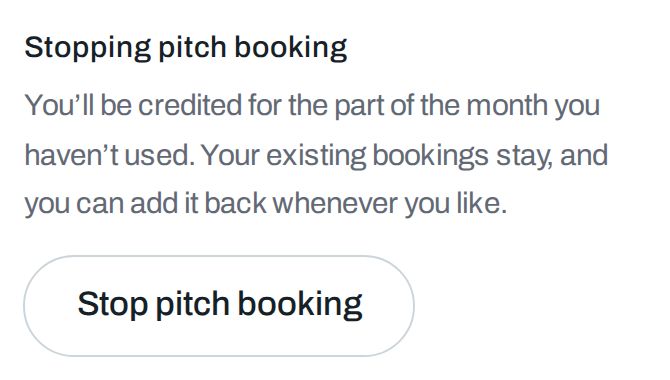
Only facility booking stops — nothing else about your club changes — and you can add it back whenever you like without buying again. If something goes wrong we’ll tell you plainly and nothing will have changed — we’d rather you tried again than believed you’d stopped paying when you hadn’t.
If a payment doesn’t go through
You won’t have to go looking for this. A notice appears across the top of every page in Club Hub and Facilities, and it says more as the situation gets worse:
- While the card is still being retried, it tells you the day of the next attempt, and facility booking carries on working until then.
- If your bank wants to confirm the payment, it says so plainly. Trying the card again won’t do it — a person has to confirm it.
- Once the retries have stopped, it says that new bookings are paused. Everything already booked stays, exactly as below.
- If the card on file is about to expire, it tells you which card and when, before anything has gone wrong at all.
Only the people who can pay — club admins — are shown it, so a secretary isn’t worried by something they can’t act on. Pressing × puts it aside until you next sign in, and it comes straight back if the situation gets worse.
The Subscription app’s Summary always has the whole story: the amount outstanding, the card on file, and the button that pays it. The notice takes you straight there.
If it lapses, or you cancel, or a trial ends
This is the part worth knowing before it happens, and it’s the same in all three cases:
- Every booking you already have stays. Nothing is cancelled.
- You can still move, cancel and take payment for those bookings.
- What stops is taking new bookings, until the subscription is active again.
- Your public booking page quietly stops offering times, rather than showing visitors an error.
So a lapsed subscription never leaves you unable to honour something you’ve promised somebody.